What makes a good photo for a coloring page
The fastest way to get clean outlines is to start with the right photo. This page shows you exactly what to pick, what to avoid, and how to fix common issues in seconds.
- Pick photos that create clear edges and simple shapes
- Improve results with lighting and background choices
- Get a print ready A4 PDF from your image
Related: Pillar page
Why photo quality matters for line art
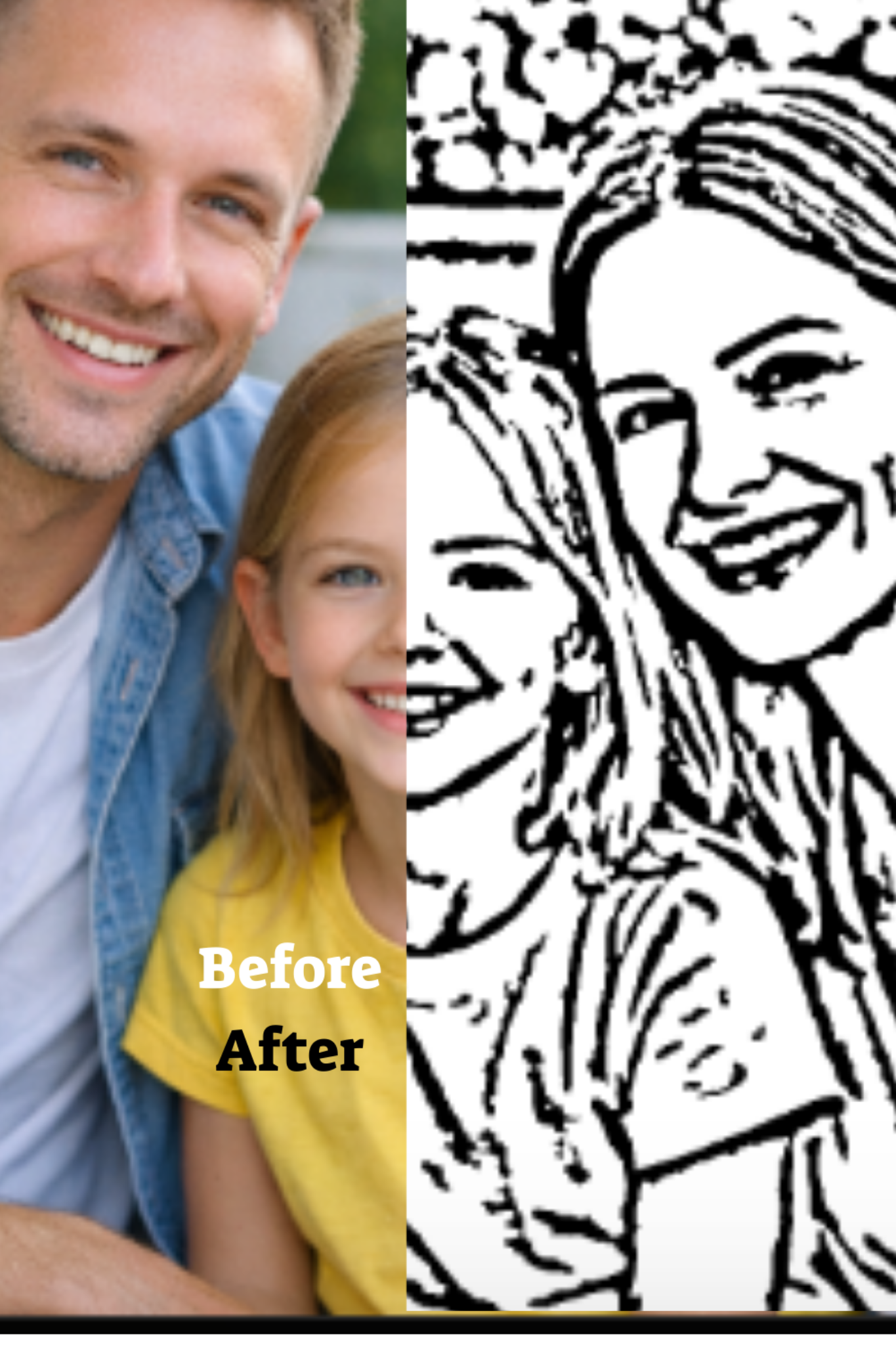
A coloring page is basically a map of edges. The clearer the edges in your photo, the cleaner the outlines. When a photo is blurry, noisy, or cluttered, the outline step has to guess. Guessing creates messy lines, broken shapes, and confusing detail. When you start with a clean photo, the result looks premium and prints well.
If you want the full process from upload to printable PDF, use the main hub: Photo to coloring page. This page is focused on choosing the best input photo so the hub page performs better in search and in real outcomes.
The top 10 traits of a great photo for coloring pages
1) Sharp focus
Choose a photo where faces and key objects are in focus. If you zoom in and the eyes look crisp, you are good. If everything looks soft, outlines will look shaky or broken.
2) Good lighting
Even lighting reduces harsh shadows that can turn into thick black blobs. Natural window light is ideal. Avoid very dark photos and strong overhead lighting.
3) Simple background
Busy backgrounds create extra edges. A plain wall, sky, or simple room helps the subject stand out. If the background is messy, crop tighter around the subject.
4) Strong contrast
Contrast is what separates subject from background. Dark hair on a dark couch can merge into one shape. When possible, pick photos where the subject has clear separation.
5) Front facing faces
Front or three quarter faces produce recognizable line art. Side profiles can work, but they are less forgiving. For kids, recognizable faces matter more than artistic angles.
6) Medium distance
Extremely close selfies can distort features. Very distant group shots lose detail. Aim for head and shoulders, or waist up for family photos.
7) Minimal motion
Motion blur is the enemy. Pick a photo where hands, hair, and faces are still. If kids were moving, choose the frame where they paused.
8) Clean edges
Objects with clear borders convert best: faces, pets, toys, simple clothing shapes, and clear hair outlines. Fine lace, tiny patterns, and heavy texture can add noise.
9) Limited tiny details
A good coloring page has space to color. Photos full of micro detail can overwhelm kids. You want a few large shapes, not a million small shapes.
10) Enough resolution
You do not need a studio camera, but you do need enough pixels. Most modern phones are fine. If the photo was downloaded from chat apps and looks compressed, try the original.
Best photo types that consistently work
Family portraits
Family portraits are the safest choice because faces are clear and the purpose is already emotional and personal. Choose photos with good lighting and avoid backgrounds full of furniture and strong patterns.
Kids playing with one main subject
If the child is holding one toy or standing near one object, the outlines stay readable. If there are ten toys, the page becomes clutter. Simple scenes are better.
Pets
Pets can look amazing as coloring pages when the fur pattern is not too complex. Pick photos where the pet has a clear silhouette and where the eyes are visible.
Photos to avoid
Very dark photos
Low light photos have noise. Noise becomes speckled outlines and messy shading. If a photo looks grainy, choose a brighter one.
Heavy filters
Filters can crush shadows or add fake texture. Use the original photo when possible. Natural colors are easier to convert into stable edges.
Busy patterns
Stripes, complex wallpaper, or detailed clothing create too many lines. If you must use the photo, crop tighter to reduce background and patterns.
Quick fixes before you upload
Crop tighter
Cropping is the simplest fix. Remove distractions. Center the face or main subject. Your goal is to reduce the number of competing edges.
Increase brightness slightly
If the photo is a bit dark, raise brightness a little. Do not overdo it. You want clearer separation, not blown out highlights.
Choose the original file
Photos shared through messaging apps can be compressed. Compression adds artifacts that look like random edges. If you have the original photo from your phone camera roll, use that.
Once you have a good photo, follow the hub page to create your printable PDF: Photo to coloring page.
FAQ
Do I need a professional camera?
No. A modern phone is enough. The biggest factors are focus, lighting, and a simple background.
Can I use group photos?
Yes, but keep the group small and avoid tiny distant faces. If faces are too small, outlines lose meaning.
What if the preview looks too detailed?
Try a simpler photo, crop tighter, or choose a frame with fewer objects. Fewer edges usually means a better page.
Next step
You now know what to pick. Use your best photo and generate your page. Start here: Create a coloring page. If you want the complete end to end guide, go here: Photo to coloring page.
Back to the pillar: Turn family photos into printable coloring pages.
Ready to create your coloring page
Upload a photo, preview the result, then choose a plan and receive your printable A4 PDF by email.